Stopped by one of the solar power companies here in Missoula this afternoon. I explained to them that I need a setup for an off-grid location and specified my needs. It would be running Starlink, some lighting, cameras, recharging small devices, and at a later date possibly a well pump and recharge an electric dirtbike. My concerns are reliability, survivability, durability, and modularity. There is a high likelihood of initial vacancy during winter, meaning no heat will be at the property so batteries will be in a sheltered but unheated environment. System needs to be adaptable to future expansion without srapping whatever is already in place.
So the terrain at the Beta Site is, to put it mildly, challenging. There’s a lot of up-n-down. This means that the Starlink signal faces some terrain obstructions in terms of range. I had wanted to get one of the remote cameras at the top of the hill (“Roadtop”) which is where 90% of the gamecam pics I post is. The problem is that the range of the wifi didnt quite make it that far.
I normally set the Starlink up on the wooden deck I built out in front of the cconex. This weekend I decided to move things around a bit. Most notable, I moved the Starlink onto the roof of the conex, giving it more line-of-sight to the cameras and I moved the solar panels up there as well.
Before I did that, though, I charged the Jackery up to 100% using the Honda EU2000. Once I did that, I unplugged everything, precariously carried it up a ladder, and set it all back up. I turned the Jackery back on, plugged in the Starlink, and I was in business.
Except for one little detail. The display showed an output of about 15w, which is about average for the Starlink. But on the input side, it said it was receiving 0 watts input from the solar panels. THat can’t be right, thought I…its bright sun and there’s no obstructions. Those panels should be kicking out at least a 100w. So I checked all the connections. All good. Zero watts. So I unplugged everything and replugged it back in. No watts coming in. Spent twenty minutes going thorugh YouTube and Reddit links looking for tips. And that’s when the penny finally dropped.
You can’t put gas into a tank thats already full. The reason the Jackery was showing 0 watts coming into it was because the battery was at 100% full…as such, the battery management system shuts off the input from the panels. To double check, I disconnected the panels, put a high draw device on the battery, and when the battery charge hit 99% I plugged the panels back in. Display showed 125w incoming.
So, as the post heading says, I’m not as smart as I think I am.
On the bright side, moving the Starlink 12 feet higher did, in fact, extend the range of the wifi and I got the camera exactly where I wanted it at the roadtop. If CostCo still has them in stock, I’ll pick up one more camera and see if I can get on mounted on the alternate-entrance road.
What I have up at the Beta SIte right now is okay for the immediate short term. But those flexible folding panels aren’t as resilient as purpose-built ones, that battery is not large enough to cover my anticipated needs and contingencies, and at some point hteres going to have to be a significant expenditure to get something a little (or a lot) more serious. That’s one of the things on tap for next year. In the meantime though, this little setup is delivering for my rather small needs at the moment. But next year…different story.
So, the background here is that The Jacekry, which has been working out quite well, has a hiccup – because of the type of battery it uses, charging it when the temp is below freezing will damage the battery. The battery will output power below freezing, but it will not recharge since the battery management system in the Jackery will disable the charging circuit when the temp is too low.
Now, the obvious solution is to keep the unit someplace where it will be warm. However, no such option is available at the moment. Even if I put the Jackery in the conex, it is still just in a large unheated box. It will get just as cold in there as it will outside. No help there.
But…it occurred to me that the Jackery, as it is running, has a cooling fan running. Why does it need a cooling fan? Because it generates some degree of heat. Hmmm. So, hear me out, what if the Jackery was placed in an insulated box that retained that heat to keep the unit above freezing? The type of battery used by the Jackery does not off-gas like other batteries, so thats not an issue. And, any container wouldnt necessarily be airtight anyway….think something like a styrofoam cooler with a couple small holes punched though for the cables.
This is something I need to experiment with while the weather is still reasonable. There is, of course, a couple risks here. One risk would be that, on a particularly unseasonable day, temps could get high enough that there might be a risk of overheating. I believe I can mitigate this by setting the Jackery to shut itself off and then restart in several hours (the app gives you the option of setting times for it to run). The problem with that is it would mean that when the Jackery restarts Starlink would re-boot and while I admire what Elon has created, theres no guarantee the reboot wouldnt require me to be there hands-on for a problem.
The Jacekry app indicates the temperature at the unit. So, on my next trip up there, drop it in an insulated container and track the temperature for a few hours while Im up there and see what happens.
And speaking of, local Costco has the same package I have of Jackery back in stock. However, it is not on sale as it was when I bought. Still though, I’ve been pleased with it so far and even at ‘full price’ I’m tempted top get another.
Anyway, I’ll let you know how this experiment goes.
So its been a week since I left the Jackery and panels set up at the Beta Site and left Starlink running off it so I can get live camera feeds from up there. How has that worked out, you ask?
TL;DR: awesome.
The first three days of the week were rainy and virtually sunless. As a result, the Jackery hit a low of 51% charge. After that, the sun came out and that brought it up into the mid-70% range, then 80%, and for the last two days its beein in the 93-100% range. So, for that entire length of time, Starlink was consistently running 24/7. Because there was active internet there the whole time, I could check the battery charge as often as I wanted and get real-time metrics. Here’s a few screenshots from the Jackery app:
As you can, at this particular moment in time the Starlink was drawing 17 watts. It’s draw fluctuates anywhere from 10 to 35 watts depending on how much data is going as opposed to just ‘standing by’ with the cameras off. However, what this seems to indicate, and Im an idiot in regard to electricity so perhaps Im being naive, is that for about every one hour of sunlight I’m getting about ten hours of internet.
In addition to the information shown above, it also tracks historical energy input from the panels. Observe:
SO, long story short, this was enough to let me remotely access the two remote wireless cameras I had set up. Each individual camera came with a small solar panel to power it’s internal battery. I replaced the came-with-it panel with something a little larger becase nothing kills like overkill. At one point during the three days of rain the cameras got down to about 60% charge but once the sun started doing its thing theyve been in the high 90%’s ever since.
Because I’m concerned about battery conservation, I havent left these cameras running 24/7. I just check them a couple times a day to see how the weather is up there. Because they are not running 24/7, the individual cameras seem to be doing a good job of staying ‘topped off’.
One issue I’ve had is that as I was placing a second camera, I was limited by the range of the wifi connection from the Starlink. If I’m going to continue this project, I need to move the Starlink to a location that is withing range of both cameras.
Speaking of cameras. It turns out that CostCo sells the same brand of camera but the next higher grade for only $20 more than the ‘entry’ camera from this brand that I picked up. DIfference? Separate zoom lens, remote control floodlight, and a bunch of other nice features. Absolutely worth the $20 difference, hands down. CostCo is selling it at $119, and Amazon has it currently for $139.
Unfortunately, as much fun as I am having with this, it’s going to have to come to an end soon. It appears that the Jackery battery is of the type that does not do well with being recharged when it is below freezing. What this means is that if I want to continue this fun over the winter, I need to put together a battery/charging system that uses batteries that are indifferent to being discharged/charged at temperatures below freezing.
This isn’t a flaw with the Jackery…it’s not marketed as an all-season outdoor product. Its marketed as a camping and blackout sort of gear. In those capacities, it seems to be excellent. For my purposes, its great for use during the summer months but for winter use I’m going to have to come up with something else. And, yes, the make self-heating lithium batteries but heating via electricity is incredibly inefficient and high draw.
Over the winter the batteries would be sitting in the unheated conex, so any battery solution must be predicated on that kind of environment. More research awaits.
But, in the meantime, I’m really enjoying how this is working out so far. If I lived in a place where freezing temps were not an issue, like the southern states, I’d totally have this setup going all the time.
I’ll be heading up to the Beta Site tomomrrow to install a third webcam over the area where the bears have been munching that dead mule deer. I’m exceited to see if I can get some live-action bear cam.
One of the things that has been an inconvenience at the Beta Site is the lack of cell signal for my gamecams. I have several cams out there but only one can actually check in with any regularity and even then its spotty. The ideal solution would be cameras that sent signal over the internet, thus negating the need for cell towers and signal. However, that opens up its own can of logistical worms. This weekend is an experiment in wrangling those worms.
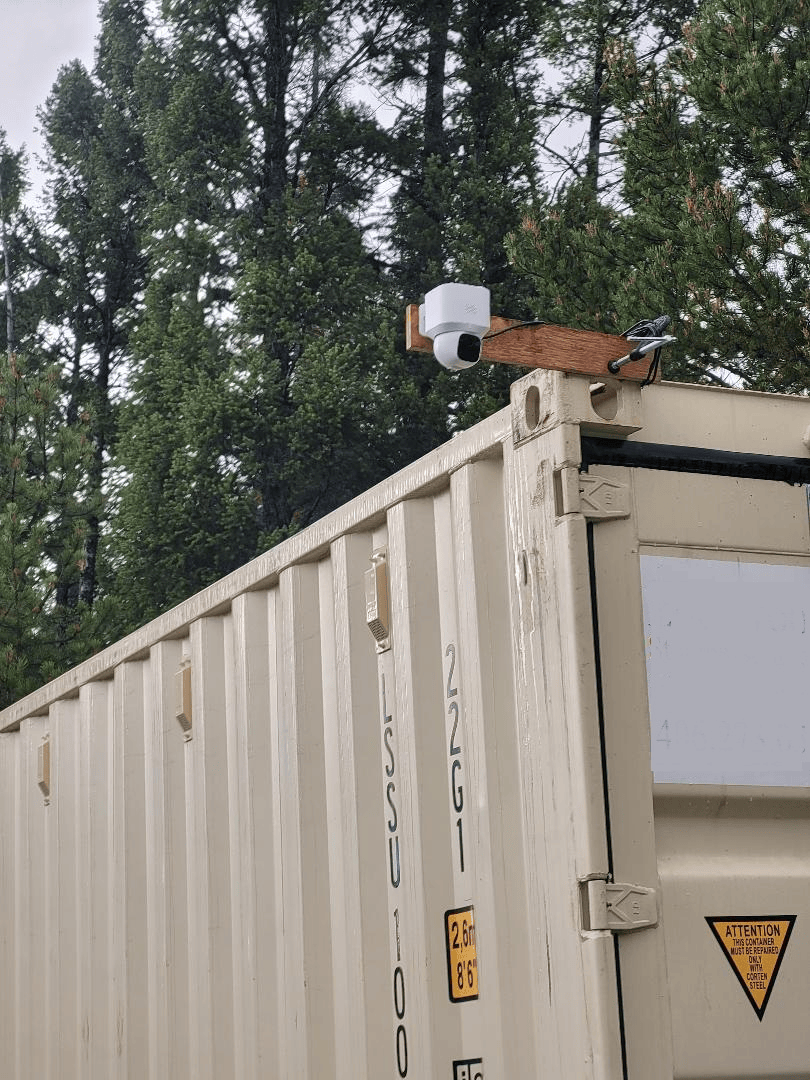
First thing we do is pick up a “Ring”-style camera. In this case a Eufy E30, which I temporarily mounted to the corner of the conex.
This camera comes with a small solar panel to keep it charged. Like most gear like this these days, the panel and charging port are USB. I had a larger Goal Zero Nomad 20-watt panel laying around and since it was significantly larger than the small panel the camera came with, I decided to use that to keep the camera topped off. I affixed some weight to the panel so it wouldnt get blown off the top of the container and set it up.
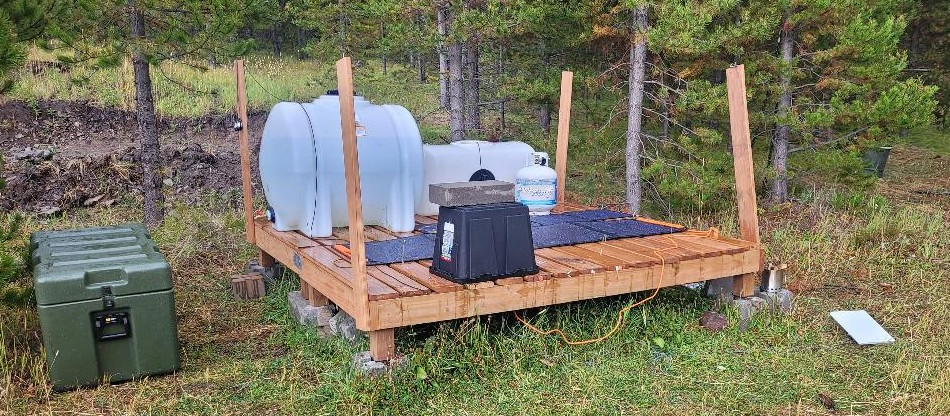
So, the camera part of the equation is done. Now for the internet part. A few trips back I experimented with the Jackery powering my StarLink setup. Under full sun the numbers were promising. It appeared that one hour of recharging under full sun gave about ten hours of internet time. I set up the panels flat on the deck, secured them so they wouldn’t blow away, and plugged them into the Jackery. This required the Jackery to sit outside which is not a great idea for electronics given that things like rain exist. After some thought, I decided that I would put the Jackery on the deck, run the wires from/to the Jackery down and through the spaces between the deck slats, and flip a plastic tub over the whole mess to keep it dry. Ventilation would come from below but rain would not.
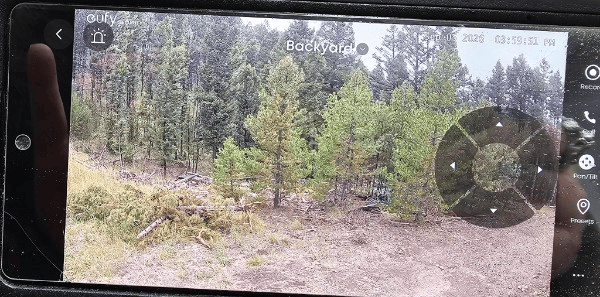
The Starlink is, by its design, waterproof and not needing of any particular protection. However, I will wind up putting a semi-permanent pole mounting for it. So…camera has power, Jackery is getting power from panels, Starlink is up and running. Lets check the phone app:
And the real kicker…the camera has a pan-tilt-zoom feature so I can move the camera around remotely to look from different angles.
Now this isn’t 100% as cool as it seems. The camera is running full-time, meaning it is constantly sending live signal upstream to the internet, even if no one is watching it. That uses power. However, I can remotely turn the camera on and off so the camera only streams images when Im actually looking at it. Thats great. But it means the camera and its motion detecting is off if something walks by it. The obvious solution to this is to provide more power and a more capacious battery for the camera itself. This isnt necessarily a problem. It would be a simple matter of creating a battery/panel charging combo similar to whats running Starlink at the moment.
The weather this weekend is rainy and overcast, so I’m curious to see how battery recharging is going to go. In theory, Starlink can run off the Jackery for about four or five days before it runs out of juice. Even with overcast weather there is still a measure of recharging that occurs, so it might be feasible to say that as long as there isnt a continuous five days of no sun, the battery will power things ‘indefinitely’. Gonna find out.
For now, I think its cool as heck to be sitting at work, pick up my phone, activate the camera, rotate it 360-degrees and see whats going on up there. We’ll see if this works out long term or not, but for right now its very cool.
Previously, when using the Starlink up at the Beta Site I have either used a small battery backup brick, or I’ve used an adaptor that lets me use my Milwaukee M18 batteries that power my tools. But, both of those did not really have an option for recharging up there. Once the batteries were drained, it was switch to another battery and take the depleted one back to the house to recharge. What to do?
The system comes with a 100w panel, but I decided to go ahead and pick up the 200w panel as well. Not cheap, but I wanted every advantage possible. The system has two inputs for panels, or you can buy an additional cable (which I did) that allows you to add panels in serial (daisy chaining) if they are panels of the same wattage. So, putting a 200w and 100w on the same cable is a no-no. I plugged the 200w panel into one input jack, and the 100w into the other input jack…no prob.
Like most electronics these days, the Jackery has an app for your phone. I found this to be an immensely interesting feature. Using the app, I linked the system to my house wireless network. Having done this, I could now, from anywhere with internet, see battery usage, charging rate, hours to charge, hours remaining, turn off the charging outputs to any devices I was charging, etc. This opens up some tremendous possibilities, which I’ll cover shortly.
The battery came completely charged, so I needed to discharge the battery so I could start documenting how well the panels worked to recharge it. Unfortunately, all I had around that needed charging were some flashlights and tool batteries. I got the battery down to about 89% before it was time to head to the Beta Site.
Got up to the Beta Site and the weather was mostly clear with a few clouds here and there. The sun went behind the clouds every so often, but most of the time it was direct late morning sunlight. I Laid out both panels and hooked them up.
As I mentioned, the app for the Jackery needs internet to send the info to your phone. So…I brought out the StarLink and fired it up. What was the draw of the StarLink versus the input from the panels? Lets go to the app:
So thats the data Im being shown when the StarLink is running. Now, at that moment Im not really doing anything internet-heavy except some texting. But even when it was a little more intensive, it was in the 24-34w range in terms of usage. Meanwhile, the panels are throwing 242w into the battery. In short, I’m using the battery up slower than the panels are refilling it. So, as long as the sun is shining, I can internet as much as I want and the battery will get more charged rather than less. But man does not live on internet alone. Lets see what happens when I throw a 12v DC Milwaukee battery charger on there and throw on a battery that needs charging and run the internet at the same time.
Note the times. While using the internet and charging the Milwaukee M18 battery, the system still charged itself up to 100~%. Even when the sun went behind a cloud there was enough input to offset the internet usage.
My anticipated usage for this sort of package is very simple: run the internet and recharge the things that need recharging (camera batts, tool batts, flashlightg batts, etc.) And for that usage, this seems to be a good way to go.
Here’s the really interesting part, though…With no recharging, this thing will run the internet for 30-37 hours. We saw that the internet was using 1/10th of the power that was coming into the system, so, as I see it, that means one hour of charging gives you ten hours internet. So, its entirely possible that with this set up I might be able to leave things runnig 24/7…which means internet live feed may be possible. This interest me greatly. That would open the possibility for a remote rover.
Now that would be something cool!
But back to the job at hand… So I’ve had one weekend of playing with the Jackery. I’ve left it up at the Beta Site in the cargo container. When Im back up there in two weeks I’ll see if there was any measurable self-discharge. Even if there was, I’m convince that a half hour with both panels in place will top that tank right off.
SO, my overall impression so far is good. But, a new broom sweeps clean. Be interesting to see how this holds up over the next year or so. As I said, my very minimalist meeds seem to be met by this setup but those needs won’t be minimal forever. But until such time as I need a more comprehensive, expensive, purpose-built, battery-and-panel-heavy setup I think this might carry me through until then. So, overall: recommend.
When I head up to the Beta Site I take the StarLink setup with me because a) its nice to be able to have some form of contact in case something goes wrong, and b) it is exceptionally handy to have access to YouTube for finding videos on how to do whatever it is I’m up there doing.
StarLink Mini is native 12v which means it runs off of any 12v power source you can come up with. I go with batteries, although there are plenty of people who run it off of other off-grid sources like solar and hydro…and at some point I’ll be one of those people.
StarLink comes with several cables and adapters to allow you to draw power from whatever source you’ve got handy. One of those adaptors is your classic cigarette lighter type. You plug the adapter into your vehicles cigarette lighter (if your vehicle has one…different times, man), plug the USB-C cable into the adapter, plug the other end into your StarLink and youre off to the races.
For the creatively minded, this means all you need to run StarLink off of a 12v marine battery is a female cigarette lighter socket and some battery clamps. Something like this. Affix the clamps to the battery terminals and youre good to go.
Well, when I go up to the Beta Site, I usually have a bunch of Milwaukee M18 tools with me…Sawzall, chainsaw, drill, tire inflator, etc. Could I not simply run StarLink off one of the half dozen batteries I bring with me? Well, actualy, yes…yes you can.
Turns out there are devices out there to let you run cigarette-lighter-style 12v sockets off of your tool batteries. In this case, off of Milwaukee M18 batts. How well does it work? Well, I let the thing power StarLink all night and it still had juice in the morning. More importantly though, it streamlines my logistics train by using the M18 batteries I was already bringing up there. If you’re a Dewalt or Ryobi kinda guy, there are similar adaptors as well.
As I looked around, there appears to be a thriving aftermarket ecosystem of products out there that allow you to use your tool batteries for other purposes. Lehman’s, for example, offers a light that runs on tool batteries. And, as you dig around, you find more and more things tailored to use these handy power sources.
Anyway, I mention all this because if youre going to be off the beaten path and need to power something, you may want to investigate the possibilities afforded by these battery systems.
I’m not an Elon Musk fanboy but I don’t dislike him either…. I do respect him for coming up with some cool stuff and then having fun with it. The idea of a notebook-sized satellite dish to get you internet in literally any part of the world is something that was virtually unthinkable a decade or two ago.
For survivalists, one of the great headaches has always been finding a balance between living in the sticks, or even ‘off grid’, but still maintaining some type of communication with other humans…especially your fellow like-minded individuals. Most ‘bugout locations’ are short on things like powerlines and phone lines. The reliable standby has been ham radio, which has its ups and downs…there is no one perfect solution. I remember years ago that there were things like ‘packet radio’ and other radio/internet hybrids. Nowadays you just drop a Starlink on the ground in a clear area and start downloading porn. We’re living in the future.
My needs are quite simple. I’d like to have email and VoIP for voice communication. I’d also like to access Google Earth, get the news, and that sort of thing. Additionally, I’d like to have some internet-connected cameras for real-time viewing. While Starlink appears to be able to do that, the issue of powering the darn thing reliably over time is the new constraint. I need to have a battery system in place that would give me as much time as possible between charges in case I need a few weeks to get up there. I suppose I could steal an RTG from the arctic somewhere but that seems like a lot of work.
I’ll be exploring solutions but before that I need numbers. So, after unpacking the box from FedEx, I have the Starlink setup in my yard running off a small lithium battery block. This particular power supply is Bluetoothed to my phone so I can track battery life as Starlink is out there doing its thing. Then, once I figure out average usage demands and whatnot I can start scaling a battery system. Yes, of course Im going to integrate some solar panels for charging…but I need some numbers so I can calculate needs and build in extra margins. In a perfect world I’d like to have enough panels up there to charge a battery that is capable of running the thing for a solid month.
And, as I am discovering, the internet is awash with all sorts of third-party items for this little piece of tech. Notably adaptors to let you run on Milwaukee and DeWalt power tool batteries. Thats rather convenient since I’ve got a bunch of them sitting around.
The subscription side of the StarLink equation got squared this week. You can put your subscription into a sleep mode when youre not going to be using it for a length of time and that drops your monthly sub to five or ten bucks. I went with their cheapest monthly plan which is about sixty bucks. I then dumped some money into a new brokerage account, bought a bunch of weekly dividend ETFs, set the brokerage to automatically move the dividends to a new checking account at the end of the month, and then StarLink bills the debit card attached to that account. Basically, a fire and forget arrangement.
My plan was to head up to the Beta Site this weekend and experiment with the StarLink but its raining pretty heavy and I really don’t feel like negotiating heavily rutted muddy roads. And…Im too lazy to go drag the SxS out of storage. So today will be spent on other Beta-Site-related projects. Most notably, I need to put together a secure container kit to put all the StarLink gear in for transit, I need to start calculating power needs, and another one or two projects I’ll post about in a few days.
So, my plan is to have the gametrail cams (and for the sake of brevity we shall just call them trailcams from here on in) positioned at a few strategic points around the Beta Site for when I’m not there. Problem is, they rely on periodic battery swaps or recharging, and require a cell signal to send me updates and info. Now, I’m good with this for the time being. I picked up the solar panel and lithium battery pack to try out and I’ll be setting that up on my next trip up there. The ultimate plan, however, is, once something gets built, to put in a multicam DVR system like I have here in town. The drawback, of course, is going to be the power requirements. I currently run nine cameras here at the house. Each camera has its own 12v power requirement. Additionally, the DVR runs on AC power as does the computer monitor I use to watch the feeds. The ideal is to have a camera setup that goes to StarLink so I can monitor things remotely, including one camera pointed at a screen full of metrics like temperature, battery charge, etc, so I can make sure things are running smoothly when Im not there. Thing is, there is no power up there. Zero. So any system has to run on whatever power can be made available.
My understanding is that things will be more efficient if I can run everything natively on DC. (“Natively”, in this context, means that the devices were originally made to run on DC rather than AC devices that are running on AC that is coming from a DC transformer. Such arrangements, as I understand it, are not efficient.)
The cameras are DC, which means they can be run off of a battery system. And I can run a laptop monitor off of DC as well. (More on that in a few paragraphs.) StarLink, also, can be run on DC. So that leaves the one holdout being the DVR itself. I have to go hunt down if such things are available. But I also need to do some math and calculate what kind of power draw running, say, nine cameras 24/7, a DVR, a monitor, and StarLink will accrue. Then I need to imagine a battery system capable of running that type of thing and factoring how long it can run before the batteries get to , say, 50% charge. And then its a matter of calculating what kind of power input from a solar panel system is required and than scaling that to the anticipated need.
Perusing the internet has shown that many people are using PoE (power over ethernet) systems. It appears, though, that these require 48v and since power will be at a bit of a premium it may mean that a less modern 12v system of cameras and DVR will have to be the way to go.
On the bright side, I think I may have figured out one part of the equation. I was wondering about powering a computer monitor and I remembered that portable laptop monitors were a thing. I picked one up and and figured that since they were designed for use with a laptop, which is a portable DC device, perhaps I could have it simply run off a laptop-type battery.
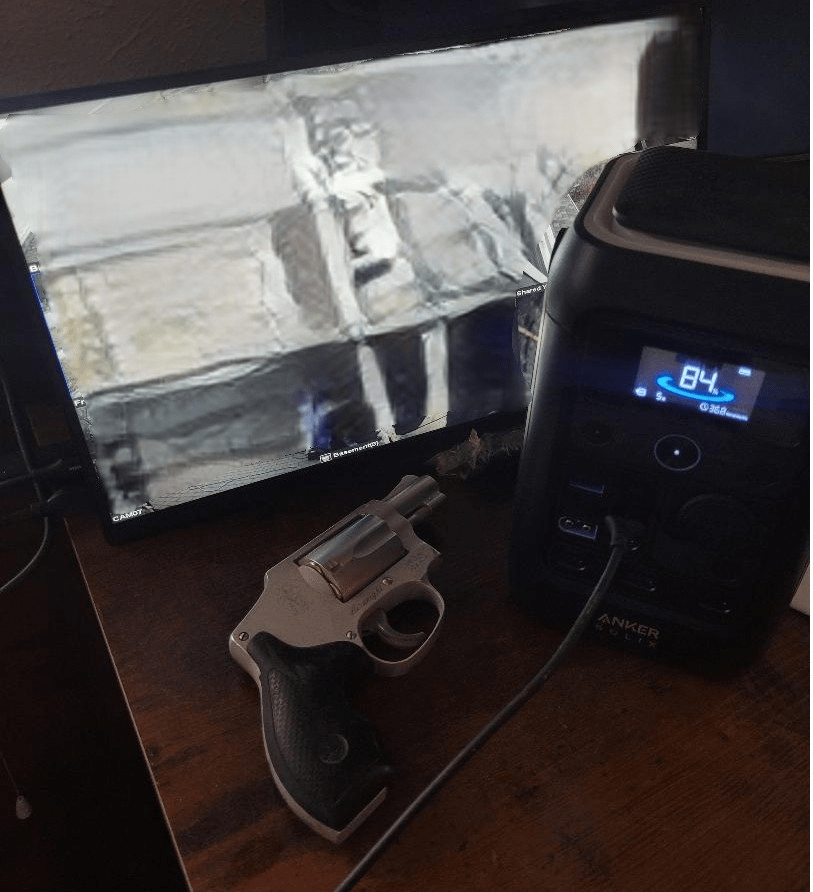
Turns out, the particular one I picked up, runs off USB-C and mini-HDMI. Googled the specs on it and it says that it uses 9.4 watts of power. Asking Google what size battery would be required to run a 9.4 watt device for 24 hours gave me the answer that “To run a 9.4-watt device for 24 hours, you need a battery with at least 225.6 watt-hours (Wh) of capacity ( ). For practical usage, accounting for efficiency losses, you should use a 12V 20Ah Lithium (LiFePO4) battery or a 12V 40Ah Lead-Acid battery.”
Hmm. Well, a while back I picked up a large lithium power pack to charge my phones and radios. Specifically, this guy. The listing says 288watt-hours. So, in theory, one 24-hour cycle of use would reduce the battery by about 78%. Thats fine, I’ll worry about capacity later, right now I want to see if this will work as-is without any weird messing around with things.
Well, yeah, of course I dithered out the images from the security cams. What are you, new here?
So, I unplugged the HDMI-HDMI cable from my DVR and plugged in the HDMI-miniHDMI cable that came with the laptop monitor. Then I grabbed a USB-C-to-USB-C cable and plugged one end into the monitor and one end into the battery pack. And it worked.So thats one part of the equation that I at least have a handle on.
Its summer, so theres always something burning somewhere. Therefore, I didnt think anything unusual about the slight tinge of smoke in the air last night. When I finally trundled off to bed, I noticed that there was some unusually bright lights outside. I peered at the security cams and, surprisingly, theres a fire truck next door. Hmmm. I step outside and ask a basement flooding, hose-dragging, ladder monkey whats going on. Turns out a power pole down the alley was on fire. He said the power company was on its way.
I asked him, should I expect the power to go out? He said he didnt know. Alright, fine. Head back in the house, climb into bed, and about three minutes later theres a sound like a shotgun going off as, I’m guessing, the transformer or junction at the top of the pole explodes. This is followed a few seconds later by the cacophony of UPS alert sounds going off in my house as my computer and security system power supplies start letting me know theyre running on batteries.
Now, really, I could have just turned off the alarms and gone to sleep secure in the knowledge that Northwestern Energy would have the issue resolved in an hour or so. Or….I could see how my preparations for such an event were working.
I appeared that only mine and about four other houses were directly affected. Most people would have slept through it if not for that gunshot-like explosion earlier. First thing I did was turn on the floor lamp in the living room. I had bought it years ago, rewired it to DC, stuck in a 12v LED light bulb, and stuffed a large AGM battery in its base. With my living lit with a ‘normal’ looking amount of illumination, it was time to check the UPS’s. I had replaced the security camera ones about two years ago. The security camera UPS’s did fine and lasted through the duration of the event. The UPS for my router and modem, however, did not. It gave up the ghost after about forty minutes and it should have lasted much longer than that. That particular UPS is due for replacement, it seems. I need to start noting dates of purchase on my UPS’s as I replace them. I’ve just been buying them at Costco for about $125 ea. In fact, maybe I should just return the weak one for an exchange…Costco is ususally pretty good about refunds.
I had no intention of dragging out the generator unless things went on until daybreak. The freezers were full enough of frozen bottled water that I wasnt worried about their contents for at least several hours.
The various flashlights I had around the house were handy and the glow-in-the-dark tape that I had applied to things like door handles and light switchplates were also handy. Only thing I’d have done differently is perhaps just build my own UPS from scratch with a couple more durable AGM batteries.
But, always eye-opening and reaffirming to have moments like this to test out theories and systems.