Stopped by one of the solar power companies here in Missoula this afternoon. I explained to them that I need a setup for an off-grid location and specified my needs. It would be running Starlink, some lighting, cameras, recharging small devices, and at a later date possibly a well pump and recharge an electric dirtbike. My concerns are reliability, survivability, durability, and modularity. There is a high likelihood of initial vacancy during winter, meaning no heat will be at the property so batteries will be in a sheltered but unheated environment. System needs to be adaptable to future expansion without srapping whatever is already in place.
So, the background here is that The Jacekry, which has been working out quite well, has a hiccup – because of the type of battery it uses, charging it when the temp is below freezing will damage the battery. The battery will output power below freezing, but it will not recharge since the battery management system in the Jackery will disable the charging circuit when the temp is too low.
Now, the obvious solution is to keep the unit someplace where it will be warm. However, no such option is available at the moment. Even if I put the Jackery in the conex, it is still just in a large unheated box. It will get just as cold in there as it will outside. No help there.
But…it occurred to me that the Jackery, as it is running, has a cooling fan running. Why does it need a cooling fan? Because it generates some degree of heat. Hmmm. So, hear me out, what if the Jackery was placed in an insulated box that retained that heat to keep the unit above freezing? The type of battery used by the Jackery does not off-gas like other batteries, so thats not an issue. And, any container wouldnt necessarily be airtight anyway….think something like a styrofoam cooler with a couple small holes punched though for the cables.
This is something I need to experiment with while the weather is still reasonable. There is, of course, a couple risks here. One risk would be that, on a particularly unseasonable day, temps could get high enough that there might be a risk of overheating. I believe I can mitigate this by setting the Jackery to shut itself off and then restart in several hours (the app gives you the option of setting times for it to run). The problem with that is it would mean that when the Jackery restarts Starlink would re-boot and while I admire what Elon has created, theres no guarantee the reboot wouldnt require me to be there hands-on for a problem.
The Jacekry app indicates the temperature at the unit. So, on my next trip up there, drop it in an insulated container and track the temperature for a few hours while Im up there and see what happens.
And speaking of, local Costco has the same package I have of Jackery back in stock. However, it is not on sale as it was when I bought. Still though, I’ve been pleased with it so far and even at ‘full price’ I’m tempted top get another.
Anyway, I’ll let you know how this experiment goes.
One of the things that has been an inconvenience at the Beta Site is the lack of cell signal for my gamecams. I have several cams out there but only one can actually check in with any regularity and even then its spotty. The ideal solution would be cameras that sent signal over the internet, thus negating the need for cell towers and signal. However, that opens up its own can of logistical worms. This weekend is an experiment in wrangling those worms.
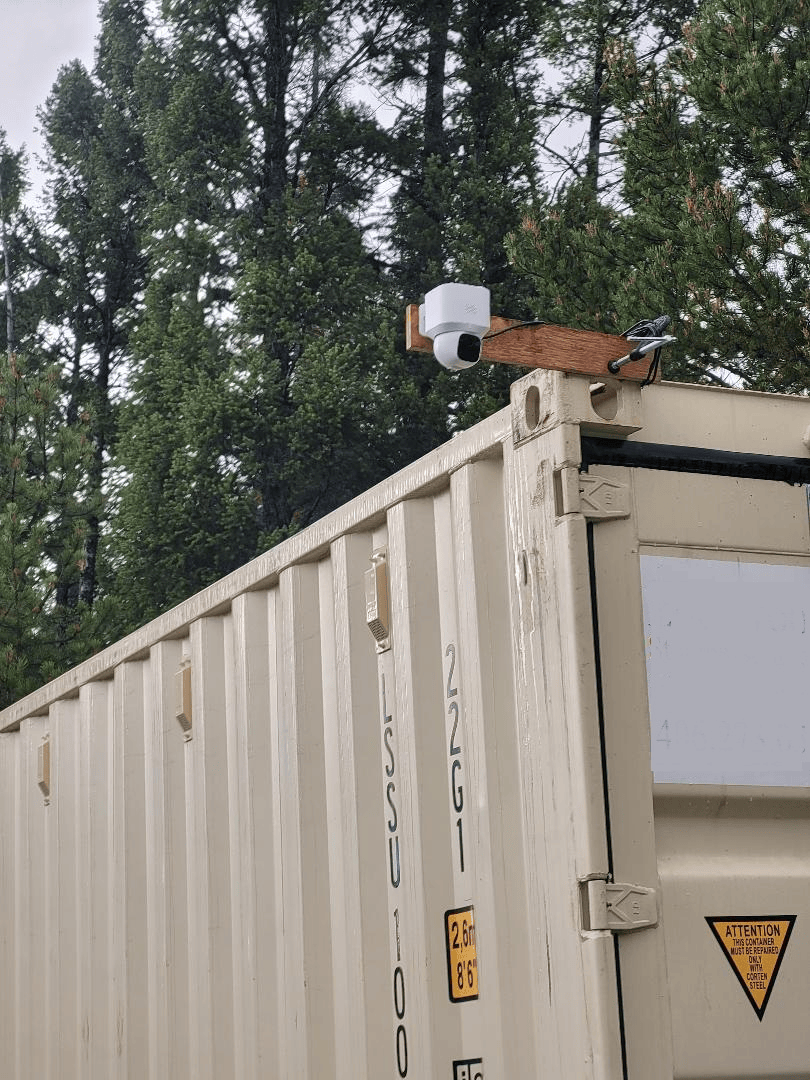
First thing we do is pick up a “Ring”-style camera. In this case a Eufy E30, which I temporarily mounted to the corner of the conex.
This camera comes with a small solar panel to keep it charged. Like most gear like this these days, the panel and charging port are USB. I had a larger Goal Zero Nomad 20-watt panel laying around and since it was significantly larger than the small panel the camera came with, I decided to use that to keep the camera topped off. I affixed some weight to the panel so it wouldnt get blown off the top of the container and set it up.
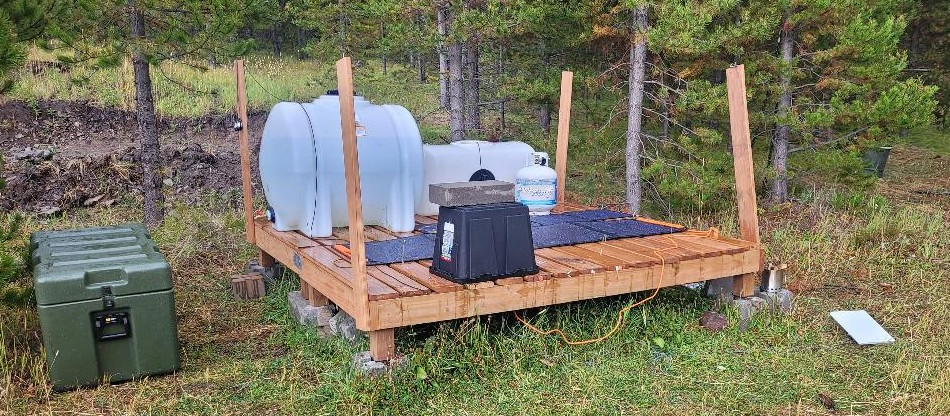
So, the camera part of the equation is done. Now for the internet part. A few trips back I experimented with the Jackery powering my StarLink setup. Under full sun the numbers were promising. It appeared that one hour of recharging under full sun gave about ten hours of internet time. I set up the panels flat on the deck, secured them so they wouldn’t blow away, and plugged them into the Jackery. This required the Jackery to sit outside which is not a great idea for electronics given that things like rain exist. After some thought, I decided that I would put the Jackery on the deck, run the wires from/to the Jackery down and through the spaces between the deck slats, and flip a plastic tub over the whole mess to keep it dry. Ventilation would come from below but rain would not.
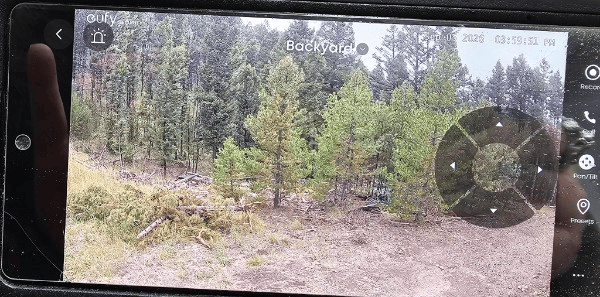
The Starlink is, by its design, waterproof and not needing of any particular protection. However, I will wind up putting a semi-permanent pole mounting for it. So…camera has power, Jackery is getting power from panels, Starlink is up and running. Lets check the phone app:
And the real kicker…the camera has a pan-tilt-zoom feature so I can move the camera around remotely to look from different angles.
Now this isn’t 100% as cool as it seems. The camera is running full-time, meaning it is constantly sending live signal upstream to the internet, even if no one is watching it. That uses power. However, I can remotely turn the camera on and off so the camera only streams images when Im actually looking at it. Thats great. But it means the camera and its motion detecting is off if something walks by it. The obvious solution to this is to provide more power and a more capacious battery for the camera itself. This isnt necessarily a problem. It would be a simple matter of creating a battery/panel charging combo similar to whats running Starlink at the moment.
The weather this weekend is rainy and overcast, so I’m curious to see how battery recharging is going to go. In theory, Starlink can run off the Jackery for about four or five days before it runs out of juice. Even with overcast weather there is still a measure of recharging that occurs, so it might be feasible to say that as long as there isnt a continuous five days of no sun, the battery will power things ‘indefinitely’. Gonna find out.
For now, I think its cool as heck to be sitting at work, pick up my phone, activate the camera, rotate it 360-degrees and see whats going on up there. We’ll see if this works out long term or not, but for right now its very cool.
Previously, when using the Starlink up at the Beta Site I have either used a small battery backup brick, or I’ve used an adaptor that lets me use my Milwaukee M18 batteries that power my tools. But, both of those did not really have an option for recharging up there. Once the batteries were drained, it was switch to another battery and take the depleted one back to the house to recharge. What to do?
The system comes with a 100w panel, but I decided to go ahead and pick up the 200w panel as well. Not cheap, but I wanted every advantage possible. The system has two inputs for panels, or you can buy an additional cable (which I did) that allows you to add panels in serial (daisy chaining) if they are panels of the same wattage. So, putting a 200w and 100w on the same cable is a no-no. I plugged the 200w panel into one input jack, and the 100w into the other input jack…no prob.
Like most electronics these days, the Jackery has an app for your phone. I found this to be an immensely interesting feature. Using the app, I linked the system to my house wireless network. Having done this, I could now, from anywhere with internet, see battery usage, charging rate, hours to charge, hours remaining, turn off the charging outputs to any devices I was charging, etc. This opens up some tremendous possibilities, which I’ll cover shortly.
The battery came completely charged, so I needed to discharge the battery so I could start documenting how well the panels worked to recharge it. Unfortunately, all I had around that needed charging were some flashlights and tool batteries. I got the battery down to about 89% before it was time to head to the Beta Site.
Got up to the Beta Site and the weather was mostly clear with a few clouds here and there. The sun went behind the clouds every so often, but most of the time it was direct late morning sunlight. I Laid out both panels and hooked them up.
As I mentioned, the app for the Jackery needs internet to send the info to your phone. So…I brought out the StarLink and fired it up. What was the draw of the StarLink versus the input from the panels? Lets go to the app:
So thats the data Im being shown when the StarLink is running. Now, at that moment Im not really doing anything internet-heavy except some texting. But even when it was a little more intensive, it was in the 24-34w range in terms of usage. Meanwhile, the panels are throwing 242w into the battery. In short, I’m using the battery up slower than the panels are refilling it. So, as long as the sun is shining, I can internet as much as I want and the battery will get more charged rather than less. But man does not live on internet alone. Lets see what happens when I throw a 12v DC Milwaukee battery charger on there and throw on a battery that needs charging and run the internet at the same time.
Note the times. While using the internet and charging the Milwaukee M18 battery, the system still charged itself up to 100~%. Even when the sun went behind a cloud there was enough input to offset the internet usage.
My anticipated usage for this sort of package is very simple: run the internet and recharge the things that need recharging (camera batts, tool batts, flashlightg batts, etc.) And for that usage, this seems to be a good way to go.
Here’s the really interesting part, though…With no recharging, this thing will run the internet for 30-37 hours. We saw that the internet was using 1/10th of the power that was coming into the system, so, as I see it, that means one hour of charging gives you ten hours internet. So, its entirely possible that with this set up I might be able to leave things runnig 24/7…which means internet live feed may be possible. This interest me greatly. That would open the possibility for a remote rover.
Now that would be something cool!
But back to the job at hand… So I’ve had one weekend of playing with the Jackery. I’ve left it up at the Beta Site in the cargo container. When Im back up there in two weeks I’ll see if there was any measurable self-discharge. Even if there was, I’m convince that a half hour with both panels in place will top that tank right off.
SO, my overall impression so far is good. But, a new broom sweeps clean. Be interesting to see how this holds up over the next year or so. As I said, my very minimalist meeds seem to be met by this setup but those needs won’t be minimal forever. But until such time as I need a more comprehensive, expensive, purpose-built, battery-and-panel-heavy setup I think this might carry me through until then. So, overall: recommend.
So, my plan is to have the gametrail cams (and for the sake of brevity we shall just call them trailcams from here on in) positioned at a few strategic points around the Beta Site for when I’m not there. Problem is, they rely on periodic battery swaps or recharging, and require a cell signal to send me updates and info. Now, I’m good with this for the time being. I picked up the solar panel and lithium battery pack to try out and I’ll be setting that up on my next trip up there. The ultimate plan, however, is, once something gets built, to put in a multicam DVR system like I have here in town. The drawback, of course, is going to be the power requirements. I currently run nine cameras here at the house. Each camera has its own 12v power requirement. Additionally, the DVR runs on AC power as does the computer monitor I use to watch the feeds. The ideal is to have a camera setup that goes to StarLink so I can monitor things remotely, including one camera pointed at a screen full of metrics like temperature, battery charge, etc, so I can make sure things are running smoothly when Im not there. Thing is, there is no power up there. Zero. So any system has to run on whatever power can be made available.
My understanding is that things will be more efficient if I can run everything natively on DC. (“Natively”, in this context, means that the devices were originally made to run on DC rather than AC devices that are running on AC that is coming from a DC transformer. Such arrangements, as I understand it, are not efficient.)
The cameras are DC, which means they can be run off of a battery system. And I can run a laptop monitor off of DC as well. (More on that in a few paragraphs.) StarLink, also, can be run on DC. So that leaves the one holdout being the DVR itself. I have to go hunt down if such things are available. But I also need to do some math and calculate what kind of power draw running, say, nine cameras 24/7, a DVR, a monitor, and StarLink will accrue. Then I need to imagine a battery system capable of running that type of thing and factoring how long it can run before the batteries get to , say, 50% charge. And then its a matter of calculating what kind of power input from a solar panel system is required and than scaling that to the anticipated need.
Perusing the internet has shown that many people are using PoE (power over ethernet) systems. It appears, though, that these require 48v and since power will be at a bit of a premium it may mean that a less modern 12v system of cameras and DVR will have to be the way to go.
On the bright side, I think I may have figured out one part of the equation. I was wondering about powering a computer monitor and I remembered that portable laptop monitors were a thing. I picked one up and and figured that since they were designed for use with a laptop, which is a portable DC device, perhaps I could have it simply run off a laptop-type battery.
Turns out, the particular one I picked up, runs off USB-C and mini-HDMI. Googled the specs on it and it says that it uses 9.4 watts of power. Asking Google what size battery would be required to run a 9.4 watt device for 24 hours gave me the answer that “To run a 9.4-watt device for 24 hours, you need a battery with at least 225.6 watt-hours (Wh) of capacity ( ). For practical usage, accounting for efficiency losses, you should use a 12V 20Ah Lithium (LiFePO4) battery or a 12V 40Ah Lead-Acid battery.”
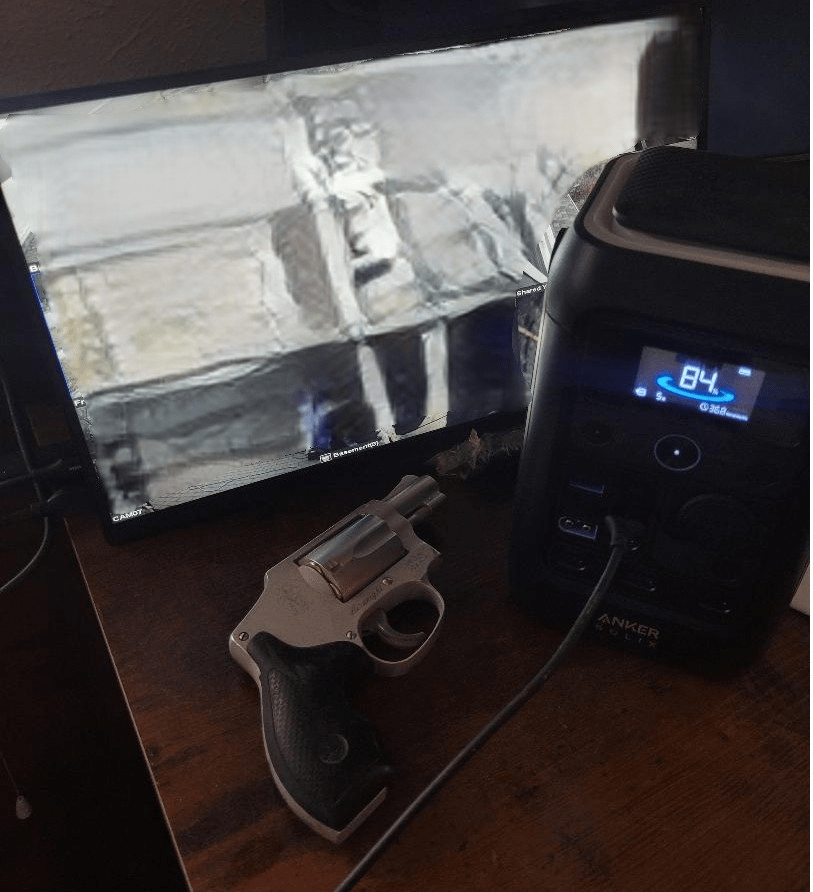
Hmm. Well, a while back I picked up a large lithium power pack to charge my phones and radios. Specifically, this guy. The listing says 288watt-hours. So, in theory, one 24-hour cycle of use would reduce the battery by about 78%. Thats fine, I’ll worry about capacity later, right now I want to see if this will work as-is without any weird messing around with things.
Well, yeah, of course I dithered out the images from the security cams. What are you, new here?
So, I unplugged the HDMI-HDMI cable from my DVR and plugged in the HDMI-miniHDMI cable that came with the laptop monitor. Then I grabbed a USB-C-to-USB-C cable and plugged one end into the monitor and one end into the battery pack. And it worked.So thats one part of the equation that I at least have a handle on.
Its a page with two episodes of The Survival Podcast on the subject of emergency backup battery systems. I listened to both episodes and was quite pleased. Lots of information and lots of very specific information…names are named. Yeah, everything the guy discusses is linked to on page and available off Amazon, but I thought the content of the two articles was so good that who was I to begrudge the man a chance to make a few bucks off his links?
I listen to TSP on and off…Far too much permaculture and gardening content for me. Not saying its not important, just saying that it gets boring after a while. Anyway, the two episodes at the link were, in my opinion, quite good and I recommend them to anyone who is still behind on getting some sort of backup/emergency power system in place.